Mineral View

Your wells, and every well around them, on one live map.

2.5 million Texas and New Mexico well records on one map. Your own wells are ringed in pink, every horizontal well is drawn along its full lateral, and the state’s record for any well is one click away.
Well records on the map2,577,541 2,435,647 Texas RRC · 141,894 New Mexico OCD The live owner portal, not a mockup
See it in the portal
Mineral View · Map
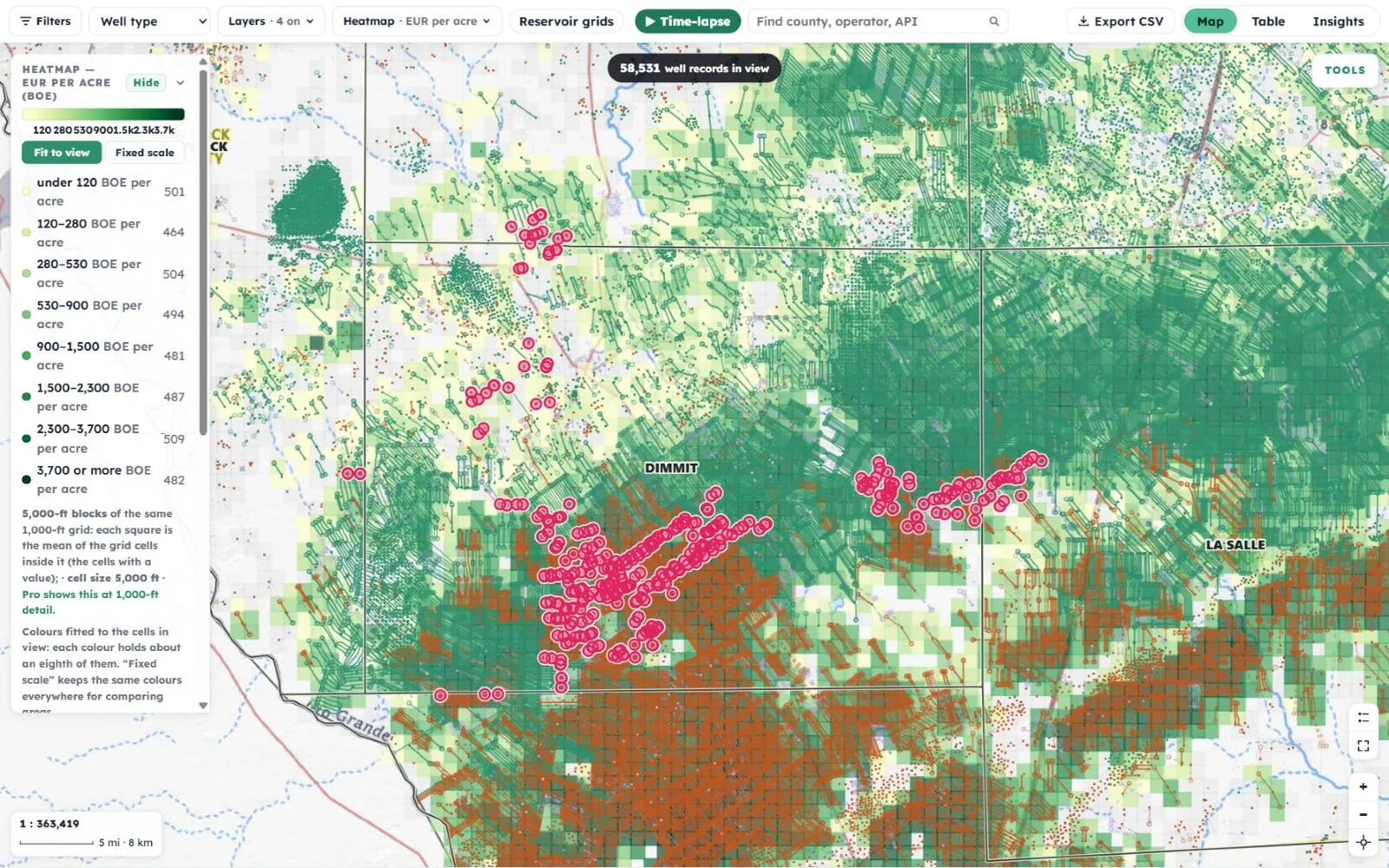
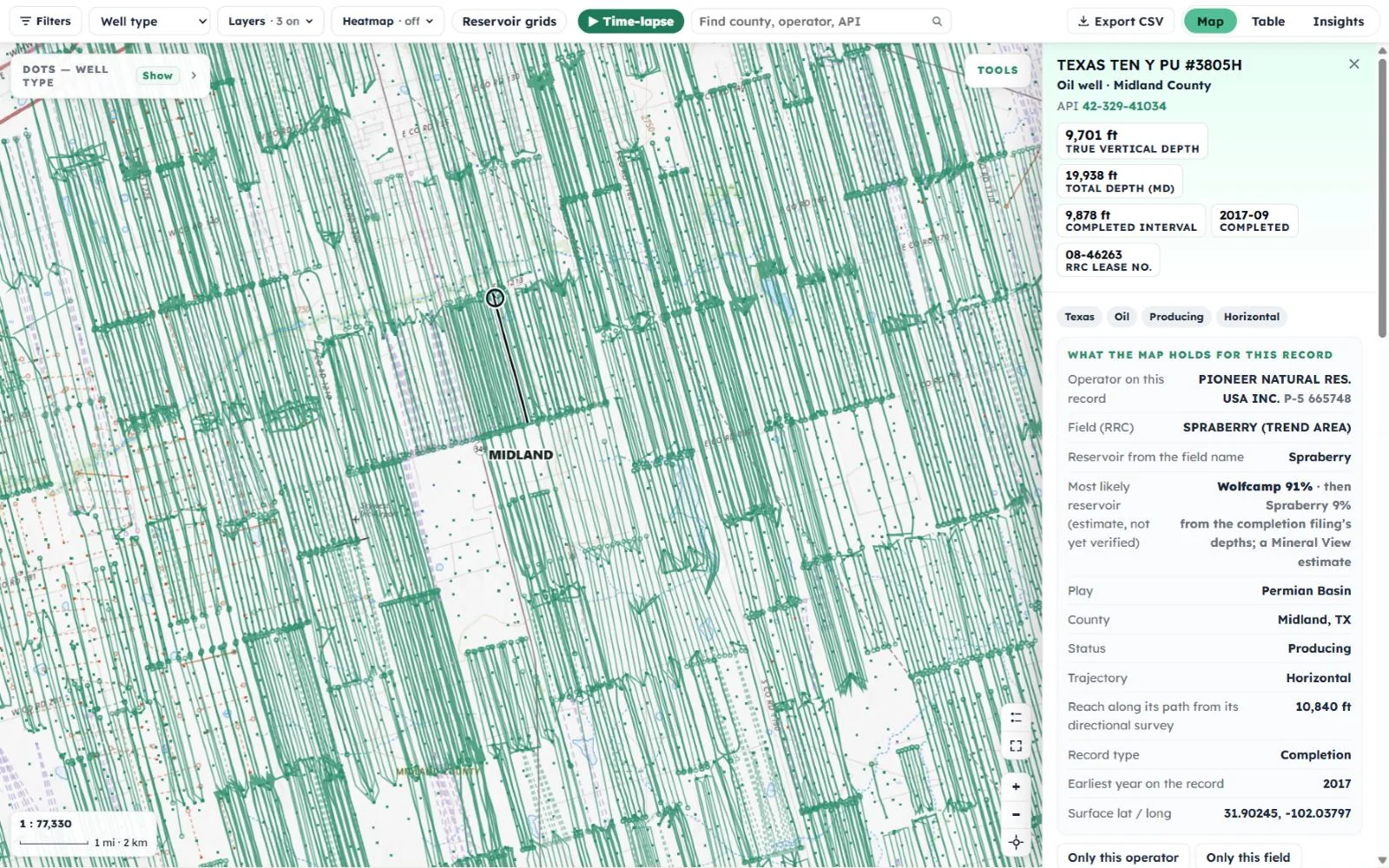
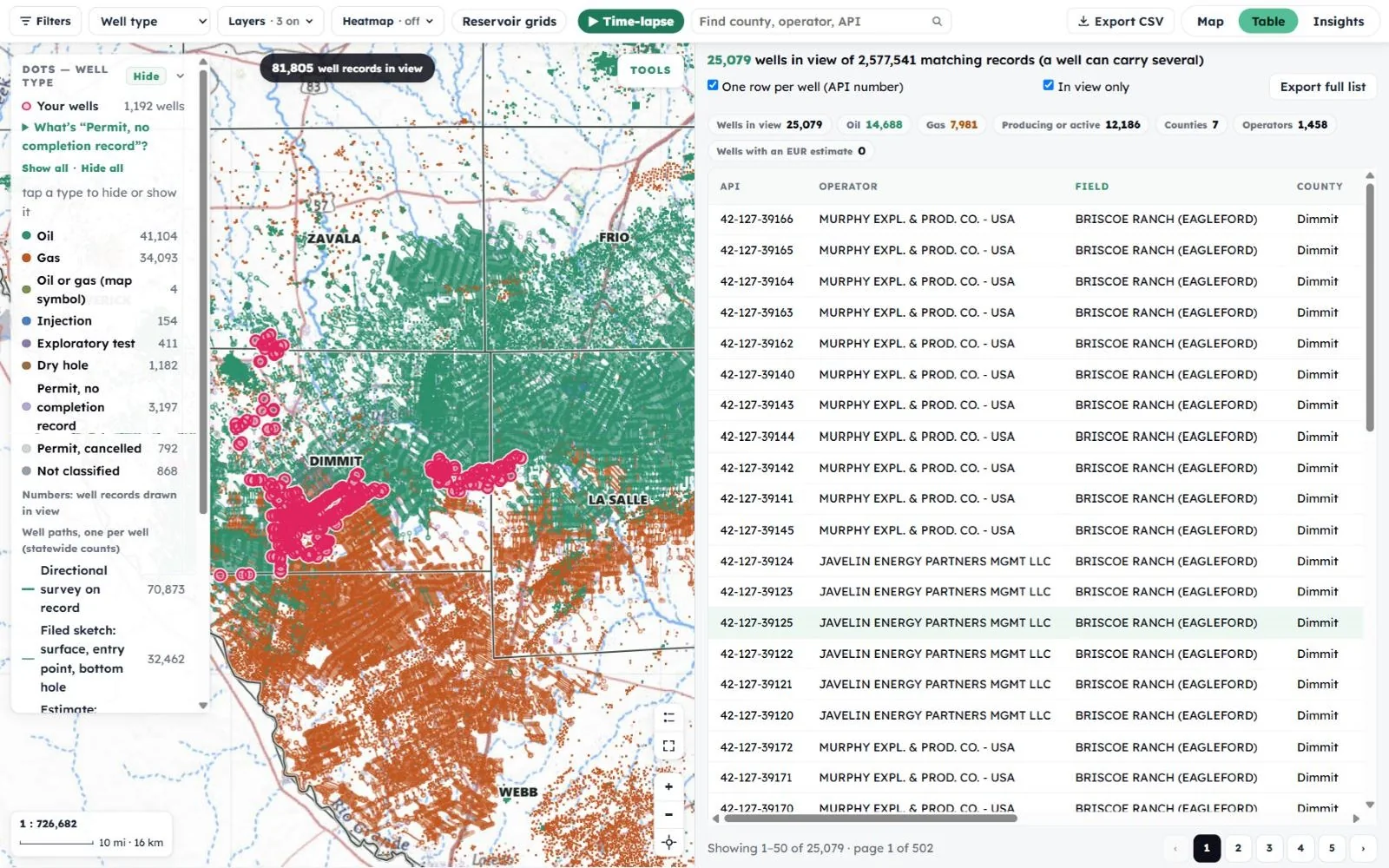
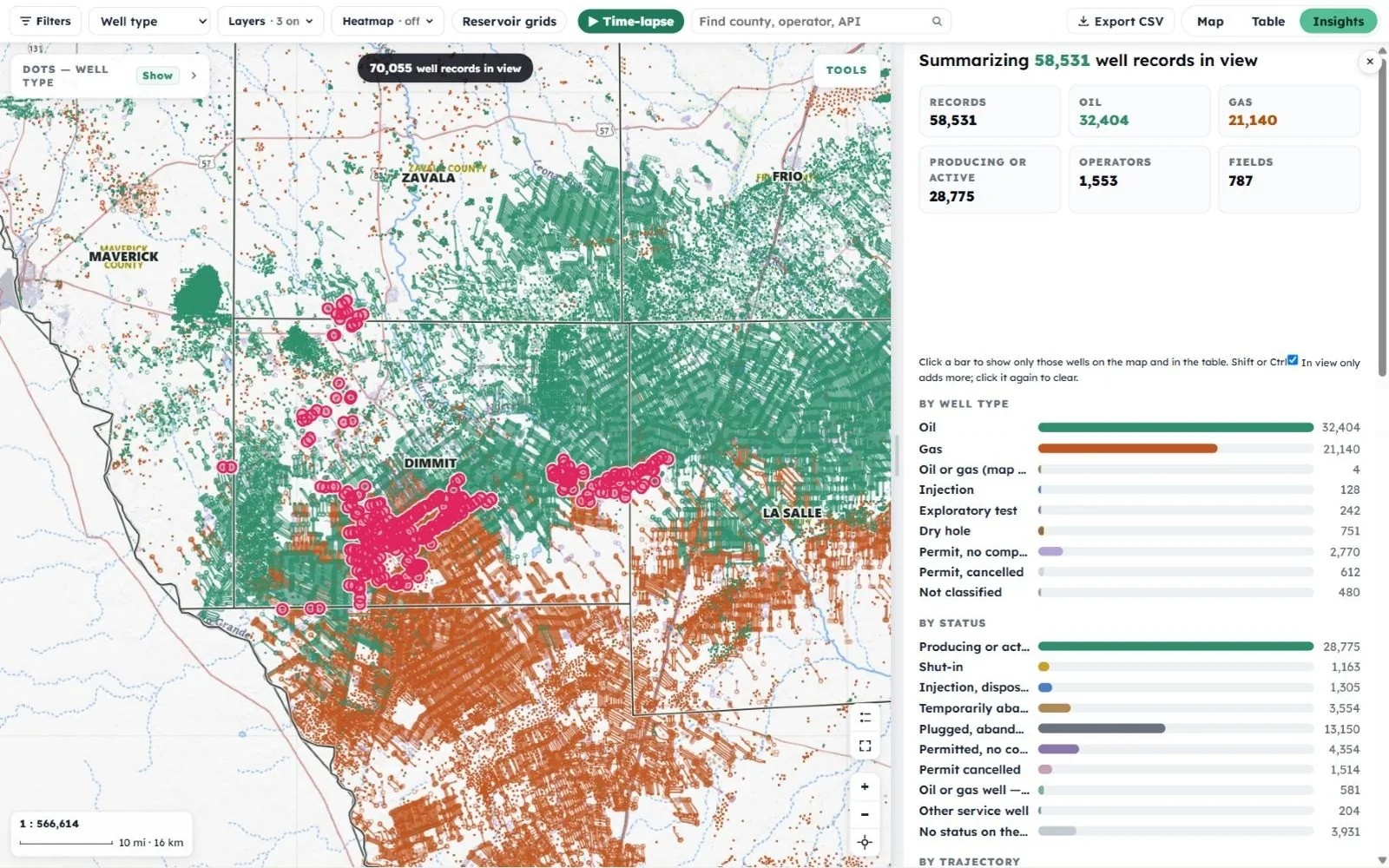
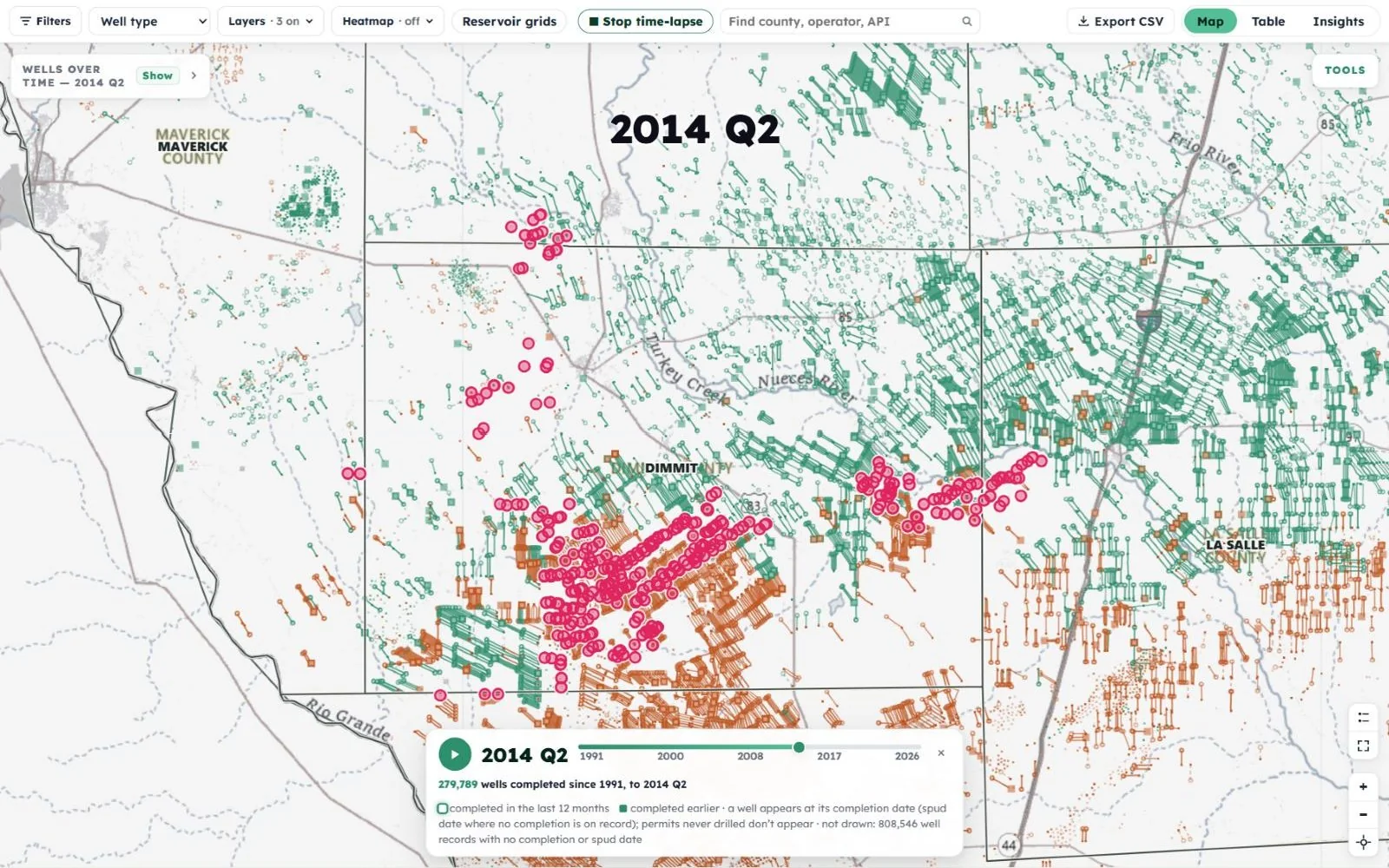
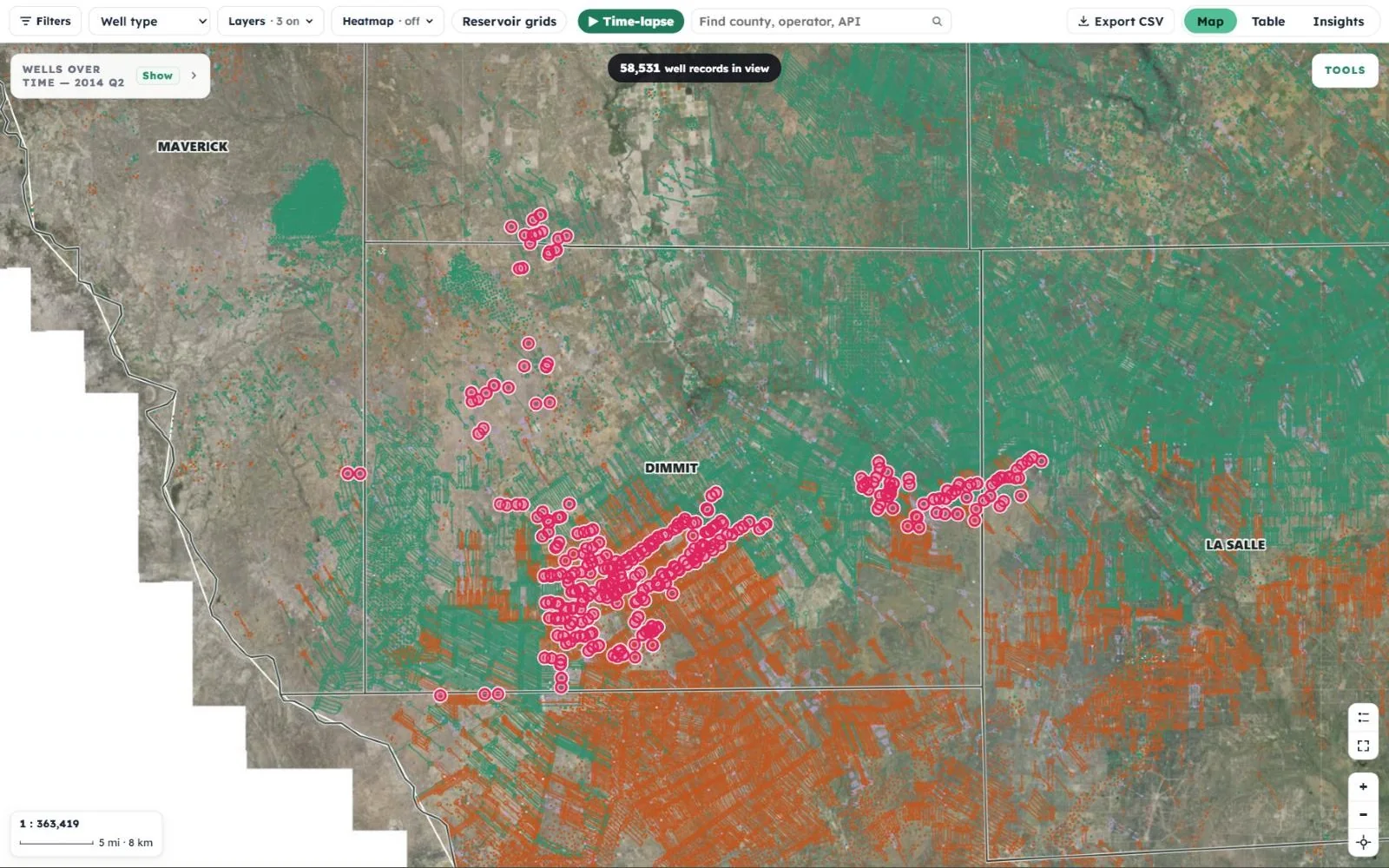
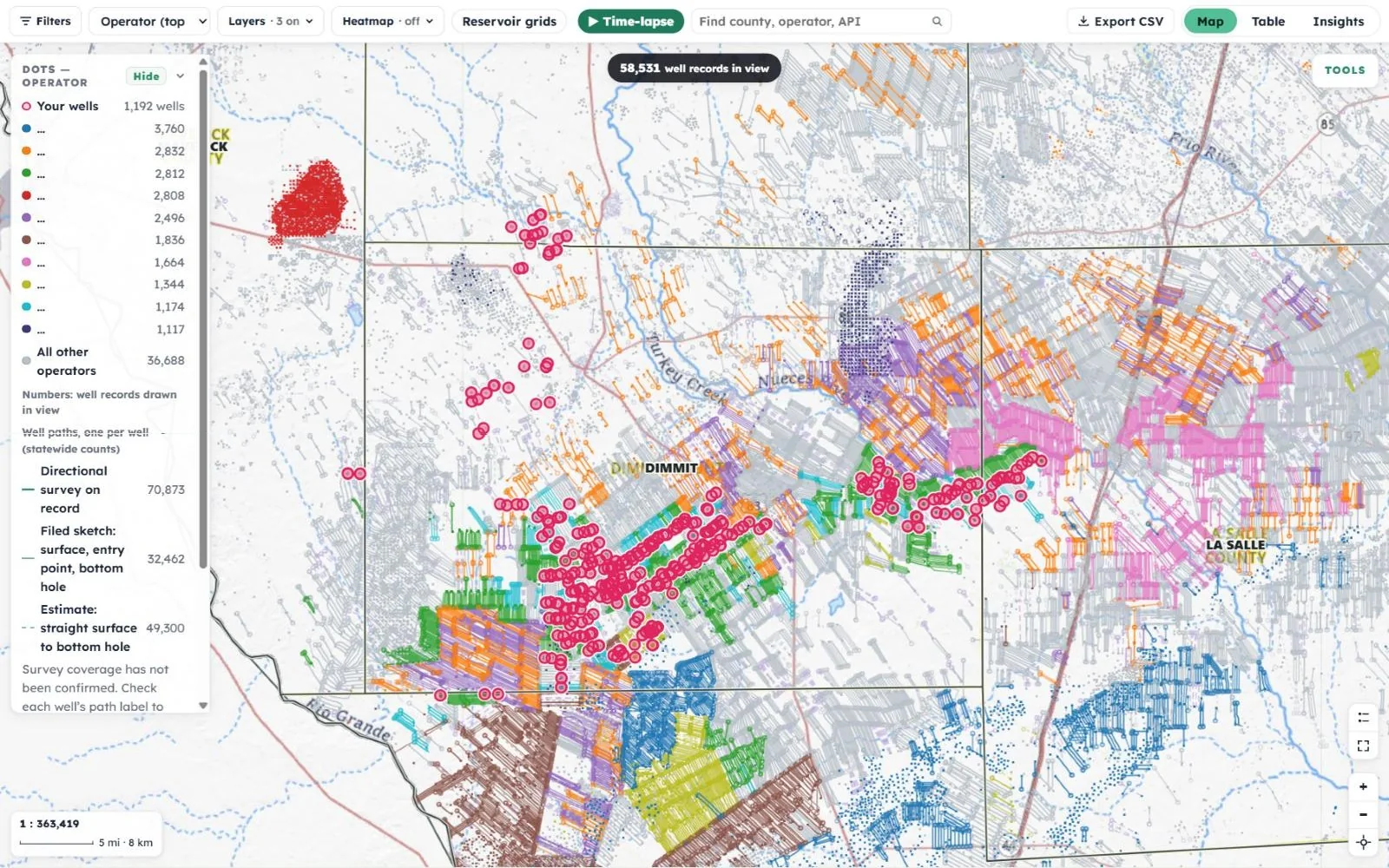
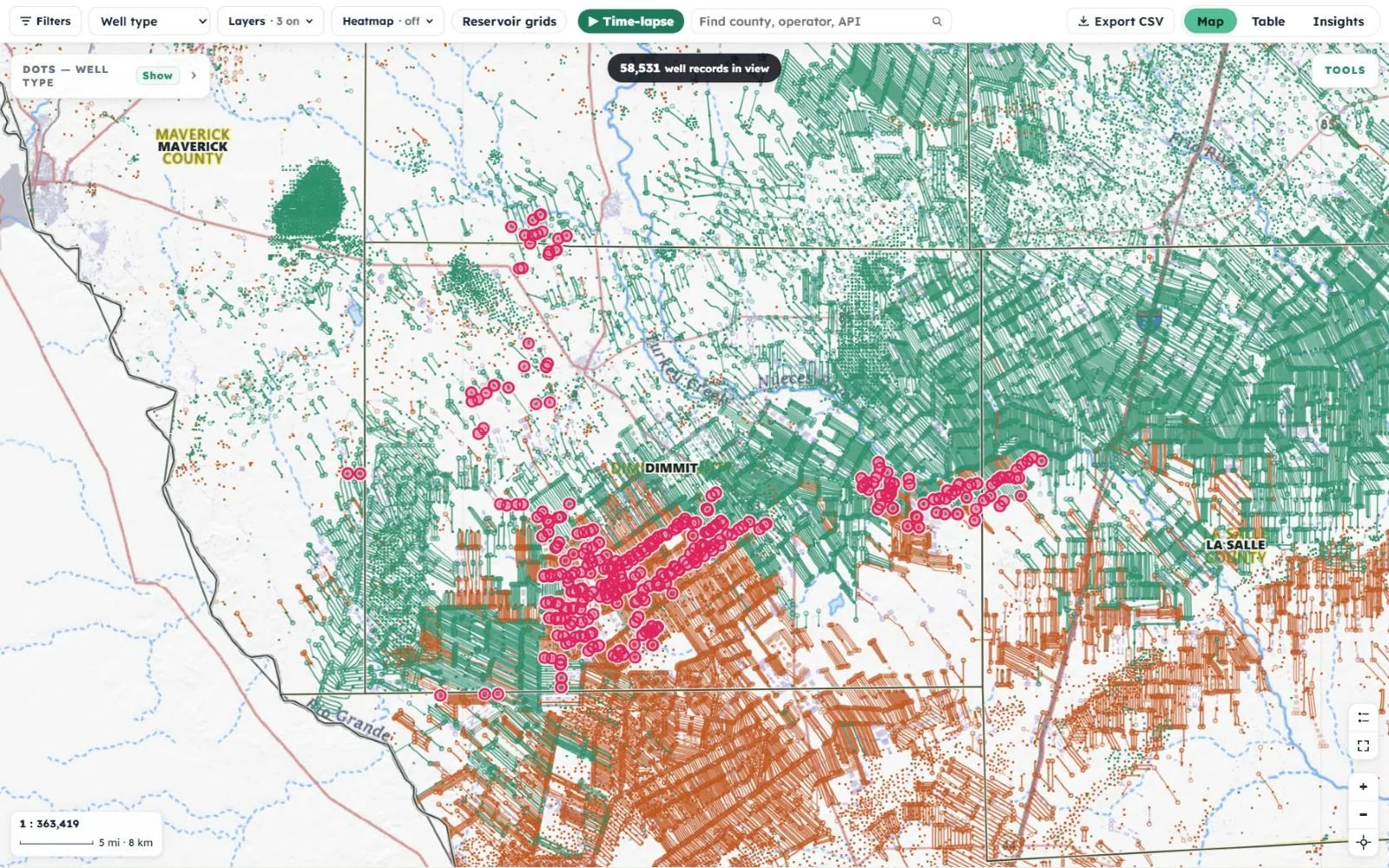
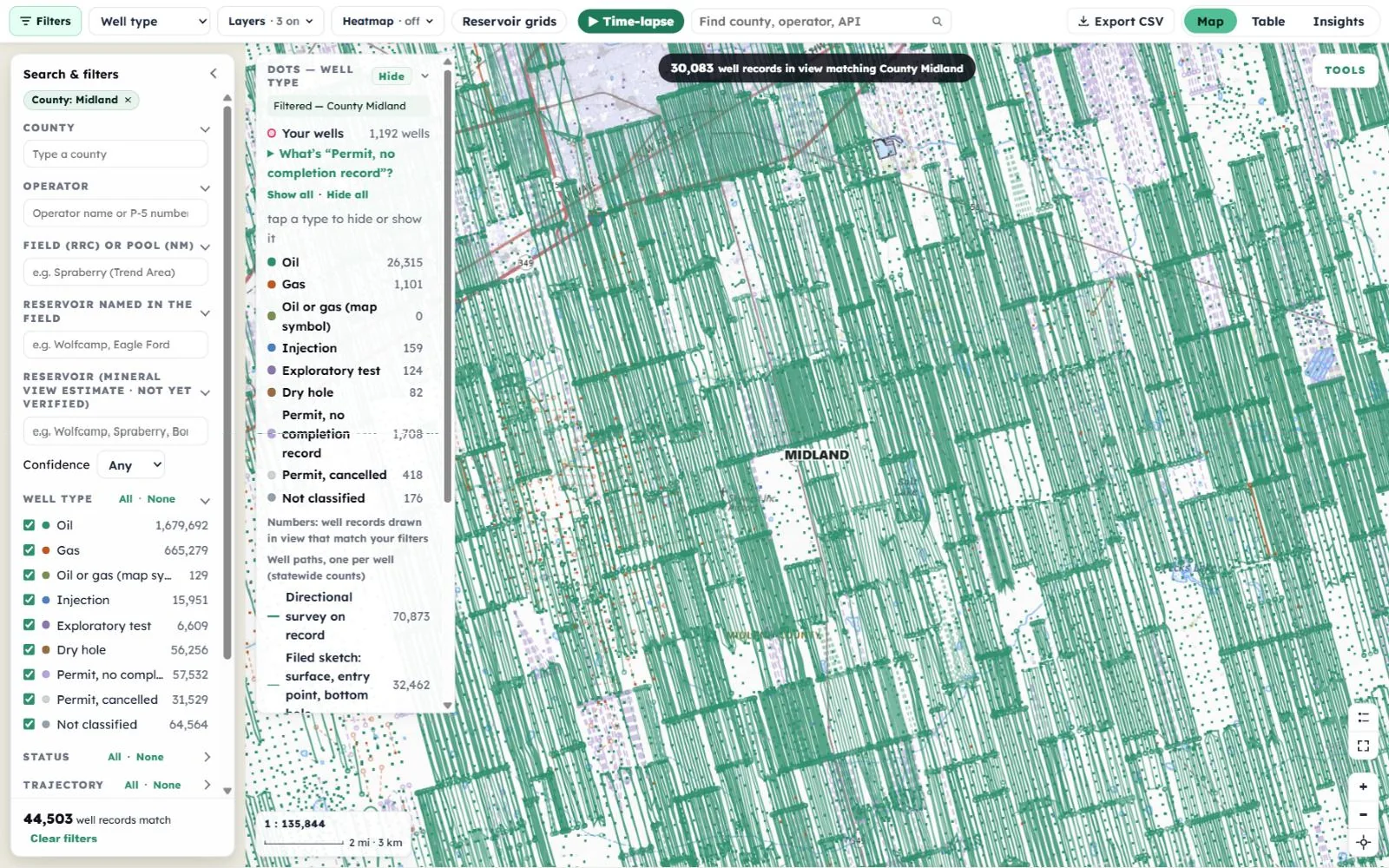
The live map over Dimmit County, Texas: the owner's wells ringed in pink among oil wells in green and gas wells in orange, with horizontal laterals drawn The Search and filters panel narrowed to Midland County, with the matching wells and their laterals filling the map The EUR per acre heatmap shading the ground from pale yellow to deep green, with its legend in BOE per acre Wells recolored by operator, each company in its own color, with the top ten in view listed in the legend A horizontal oil well in Midland County selected on the map, its surveyed path drawn in black, with its record open beside it The Table view: wells in view with oil, gas, producing, county and operator totals above sortable rows The Insights view: the wells in view summarized and broken down by type and status The time-lapse paused at 2014, with 279,789 wells completed since 1991 The imagery basemap with laterals drawn across the ground and the owner's wells ringed Horizontal wells around Midland, Texas, each drawn along the path recorded in its directional survey My wells 1,192 wellsZoom to my wells

Texas Railroad Commission and New Mexico OCD records Estimates are always labeled as estimates Free plan, no card needed

Step 1 · What it is

Your ground, in the middle of the full industry picture.

Once you claim your record, the map opens on your own wells, ringed in pink, surrounded by every well the Texas Railroad Commission and the New Mexico Oil Conservation Division have on file.
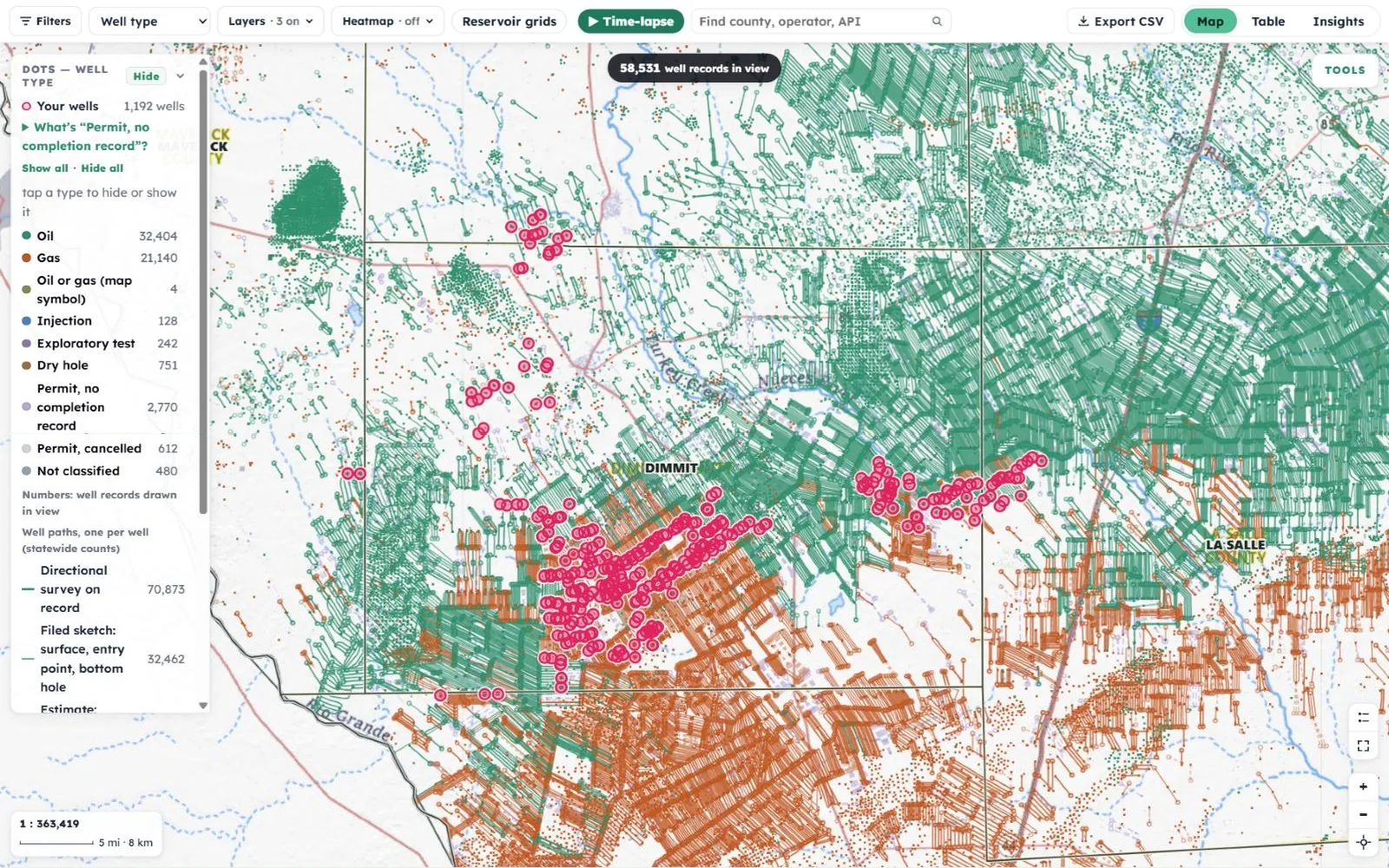
Your wells · Dimmit County, Texas
The map with the well-type legend open: your wells, oil, gas, injection, exploratory test, dry hole and permits, each with a count of the wells in view
  • ◎
    Your wells, ringed in pinkThe “My wells” bar shows how many are yours. Switch the rings off, or tap “Zoom to my wells” to jump straight to them.
  • ●
    Every well, colored by typeOil in green, gas in orange, plus injection wells, dry holes, permits and more. Tap a type in the legend to hide or show it.
  • ⌐
    Every lateral, drawnDirectional and horizontal wells show their full wellbore path, so drilling pads fan out into parallel laterals as you zoom in.
  • #
    Counts that follow youThe number of well records in view updates as you pan and zoom, from a whole county down to a single tract.

Every well record, by type (statewide)

Oil1,679,692
Gas665,279
Dry hole56,256
Permit, no completion record57,532
Permit, cancelled31,529
Injection15,951
Exploratory test6,609
Not classified64,564
Your wellsringed

Every lateral, traced from its directional survey

Well paths · Midland County, Texas
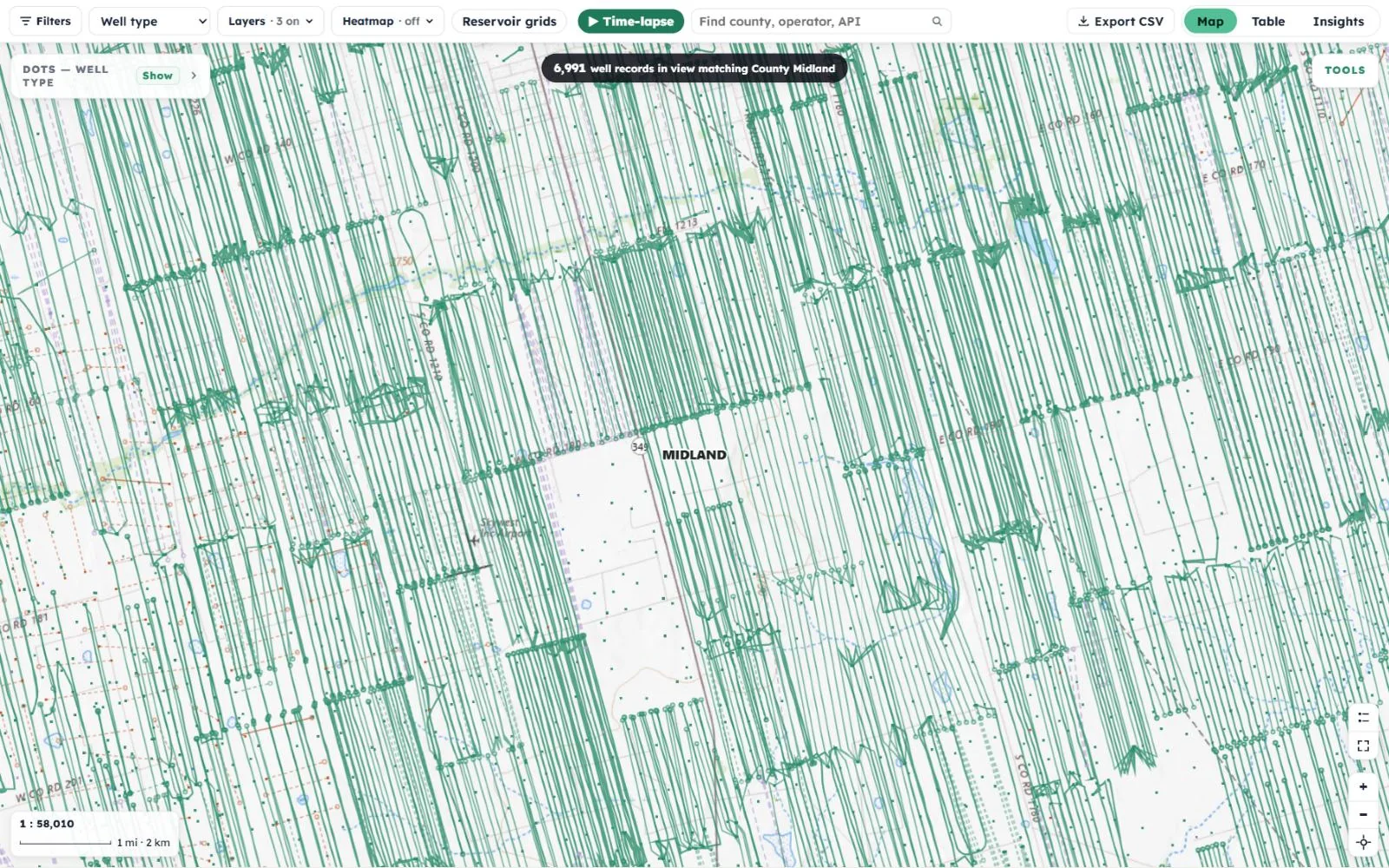
Horizontal wells around Midland, Texas, each drawn from a dot at its surface location along the path recorded in its directional survey

Midland County, in the Permian Basin. Each dot is a surface location. The line that runs from it follows the wellbore as recorded in the well’s directional survey, through the curve and out along the lateral, so you can see exactly which ground each well reaches.

70,873
Directional survey on record
32,462
Filed sketch: surface, entry point, bottom hole
49,300
Estimate: straight line, surface to bottom hole

Path counts are statewide. Each well’s record says whether its path comes from a directional survey, a filed sketch, or an estimate.

Read the full story · 3 quick answers · 1 minWhere do the wells on the map come from?Texas and New Mexico regulators publish every permit, completion and wellbore…Open

Whose records are these?

Well-location records from the Texas Railroad Commission (2,435,647) and the New Mexico Oil Conservation Division (141,894). A well can carry several records, such as a permit, a completion and a wellbore, so the map counts records, not just wells.

What’s a Mineral View estimate?

Some figures, like a well’s most likely reservoir, its estimated future production and its EUR, are our own calculations. They are always labeled as estimates, never presented as filed figures, and they are not an appraisal or a booked reserve.

Is anything missing?

Coverage may be incomplete, and each record shows its source. If you spot an incorrect record or estimate, email help@mineralview.com with the well or lease reference.

Step 2 · What you get

Turn 2.5 million dots into an answer.

Filter by county, operator, field, reservoir, well type, status, trajectory, play, record type or state. Every option shows how many records match. Try the same groups the map uses, with its real statewide counts.

Search & filters Pro Statewide counts

·
    Well records on the map
    2,577,541
    100% of the statewide records

    In the portal, filters stack: pick a county, an operator and a status, and the map, the legend, the table and the totals all update together.

    Color it, layer it, heat it

    Wells recolored by operator
    Pro

    Color wells by

    Recolor the whole map in one tap to see who drilled what and where.
    Well typeStatusTrajectoryOperator (top 10 in view)
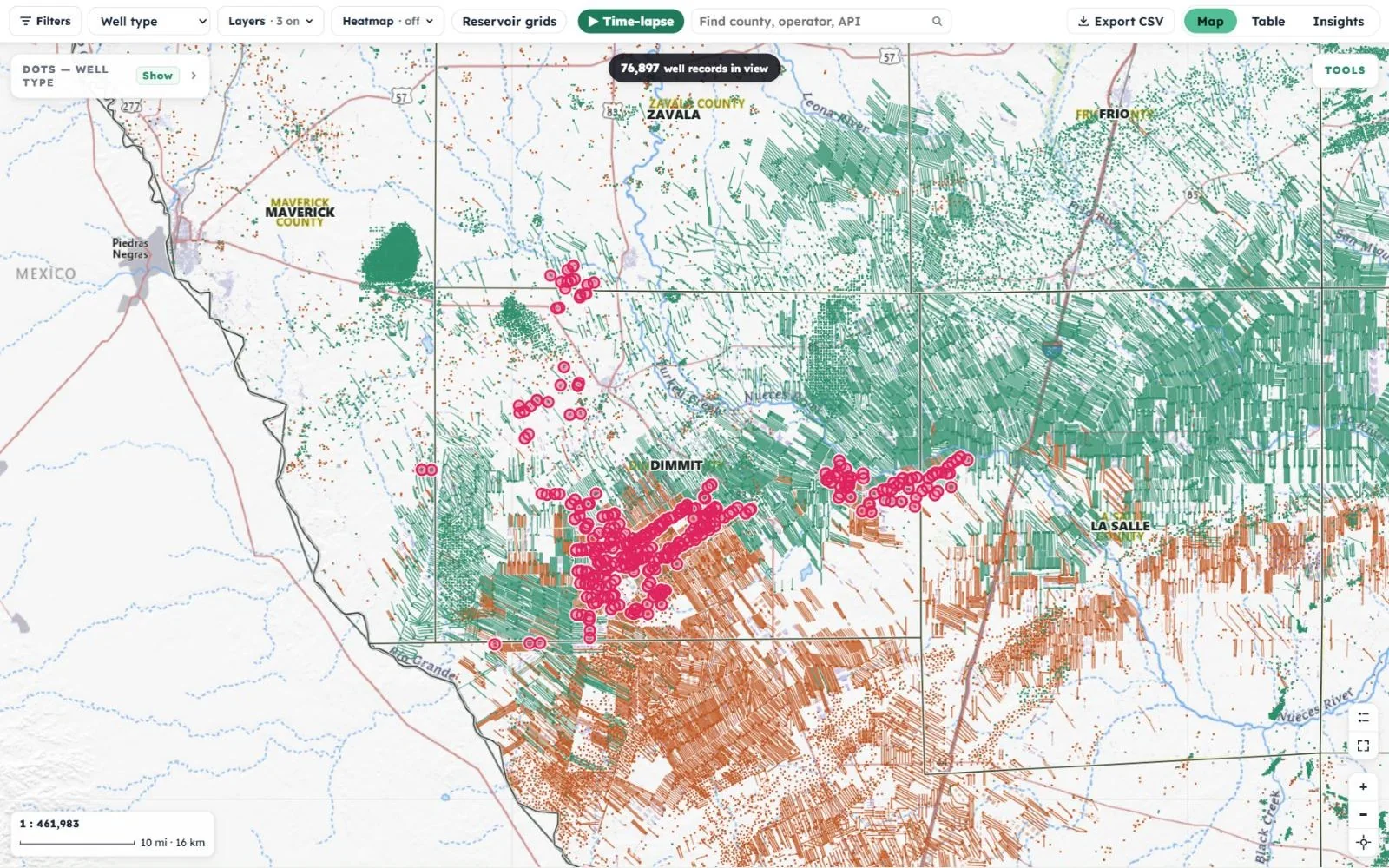
    County lines, wells and well paths drawn across Dimmit, Zavala, Frio and La Salle counties

    Ten layers

    Turn on only what you need, from county lines and well paths to the survey grid.

    County totalsCounty linesDrilling gapsSurvey gridWellsWell pathsHeatmapStructure mapTime-lapseHeat over time
    The EUR per acre heatmap
    Pro

    Heatmaps

    Shade the ground by what has been produced and drilled there, in BOE, oil or gas.

    Well densityWell spacingEUR per acreEUR per wellRecent production per acreEUR per foot of pathShare of EUR producedTime since the last wellPermit activity, 24 monthsDevelopment year

    Three more views of the same wells

    One well’s record · Midland County
    A horizontal oil well in Midland County selected on the map, its surveyed path drawn in black, with its record open: 9,701 ft true vertical depth, 19,938 ft total depth, and a 10,840 ft reach from its directional survey
    1

    Click any well and read its record

    Every dot opens a card written in plain English, with a link to the full Lease Report.

    • True vertical depth, total depth and completion date
    • The well’s path highlighted on the map, with its reach from the directional survey
    • Operator, field, play, status and trajectory
    • Most likely reservoir, labeled as a Mineral View estimate
    • Last month and last 12 months of oil and gas, produced to date, and EUR
    • How the well compares with its county peers of the same age
    • Surface and bottom-hole coordinates, Google Maps and directions
    Table view
    The Table view
    2

    Table: the same wells, as rows

    Switch to Table and every well in view becomes a sortable row: API, operator, field, county, type, status, trajectory and reach.

    • Totals for oil, gas, producing, counties and operators
    • One row per well, or every record it carries
    • “In view only” keeps the list matched to the map
    • Export the full list to CSV
    Insights view
    The Insights view
    3

    Insights: the area at a glance

    A summary of every well record in view, broken down so you can see the shape of an area before you read a single row.

    • By well type, status and trajectory
    • By earliest year on the record
    • Top operators, fields, reservoirs and counties
    • Click a bar to show only those wells, on the map and in the table

    Step 3 · How it works

    Claim your record once. Your wells are already on the map.

    Find your record, and the map opens on your own wells. Everything else on the map is there for context.

    1. Find your record

      Search your name in county appraisal records and claim it, free.

    2. See your wells

      The map opens on your wells, ringed in pink, with “Zoom to my wells” always one tap away.

    3. Ask the map

      Filter, recolor, add a layer or a heatmap, or press play on the time-lapse.

    4. Open any well

      Read its record, compare it with its peers, and open the Lease Report.

    Imagery basemap
    The imagery basemap with oil and gas laterals drawn across the ground and the owner's wells ringed in pink

    Tools for looking at the ground

    • ▭
      Draw an area ProDraw a box or polygon, count the wells inside it, and export the list to CSV.
    • ↔
      Measure distanceFrom your tract to the nearest well, accurate at any zoom.
    • ⌕
      Search the mapFind a county, operator or API number, or search the area you’re looking at.
    • ⤓
      Export CSVThe wells on screen, subject to applicable license terms.
    Topo (USGS)PaperSlateImageryImagery + labelsReliefGray reliefWater (USGS)Blue MarbleNight lights

    Free account $0

    Everything you need to see your ground.

    • The full statewide map
    • Recorded and estimated well paths, each labeled by source
    • The well-development time-lapse
    • County totals and the full well card
    • Your own wells on the map, once claimed

    Pro Paid

    For owners who want to dig into an area.

    • Color the map by operator
    • Search and filters: operator, type, status
    • Heatmaps and density views
    • Draw-an-area CSV export
    • Decline curves

    Features and limits may change. See pricing →

    Read the full story · 4 short answers · 1 minWhat does claiming my record actually do?It links your workspace to a county record, so the map knows which wells to ring…Open

    Do I need an account to see the map?

    The live map opens with a free account, no card needed. Claiming a record then adds your own wells, ringed in pink. The map guide walks through every feature without signing in.

    Does claiming prove I own the minerals?

    No. Claiming connects your workspace to a record on the county appraisal roll. It does not establish ownership, title or entitlement to payment.

    Can I visit a well I find on the map?

    Coordinates are the filed surface location. Lease roads and well sites are usually private property, so get permission before entering. The map is not for navigation or safety-critical use.

    Can I share what I’m seeing?

    Yes. Export the wells in view to CSV, or open any well in Google Maps and copy its coordinates.

    Step 4 · Why it matters

    See what’s happening around your minerals, and how it got here.

    Most owners hear about a new well from a neighbor or a landman. The map shows you the whole story first, in the state’s own records.
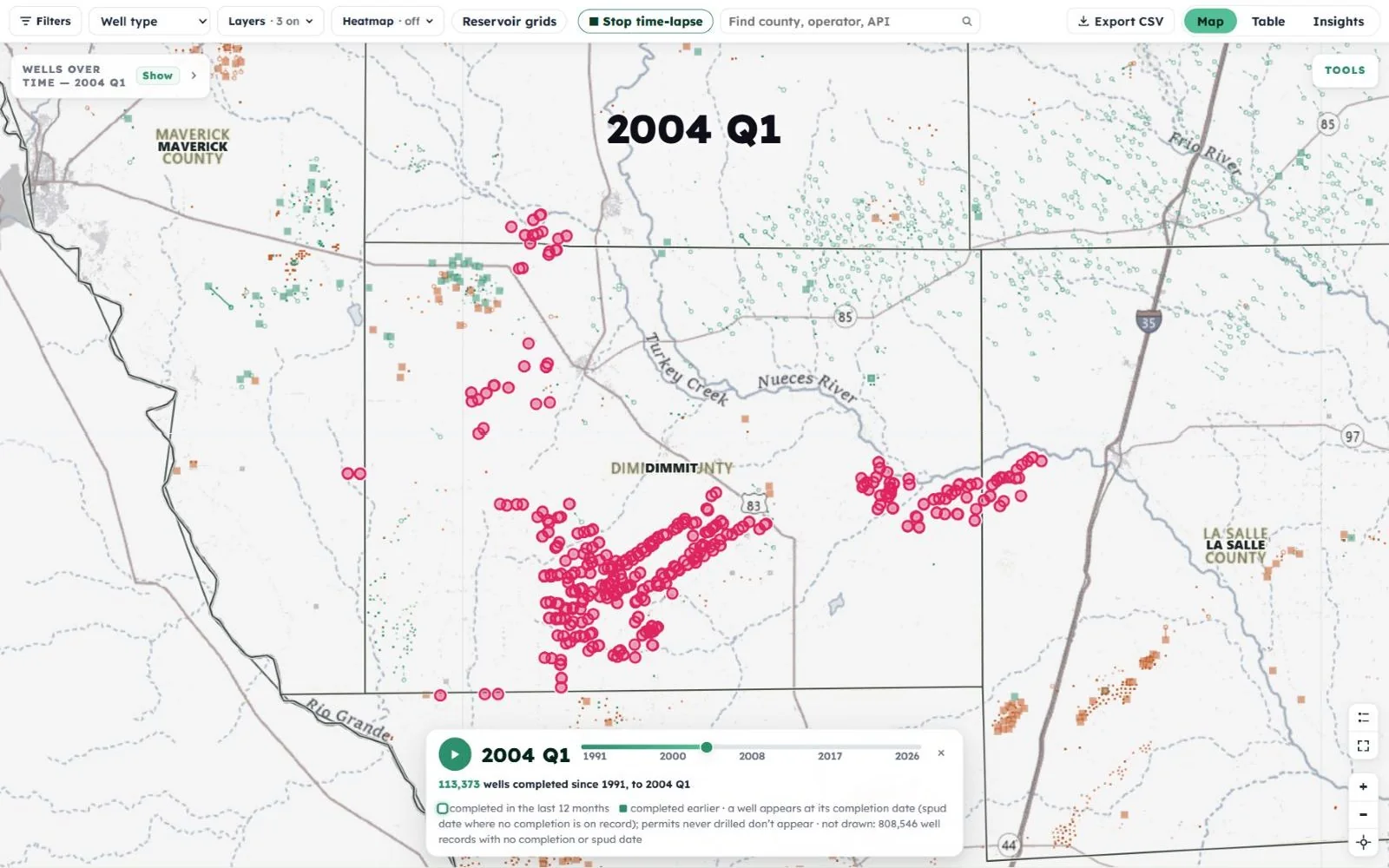
    Time-lapse at 2004: only scattered wells around the owner's acreage Time-lapse at 2014: the Eagle Ford boom has filled the area with horizontal laterals 2004 2014

    Drag to compare. The time-lapse plays from 1991 to the latest quarter on file, a quarter at a time, lighting up each well as it is completed. Around your acreage, you can watch the Eagle Ford boom arrive.

    1

    “Is drilling moving toward my land?”

    Turn on the permit-activity heatmap, or filter to permits with no completion record yet, and see where operators are filing next.

    Permits with no completion record
    57,532
    statewide, each drawn where it was filed
    2

    “Which wells actually reach under my tract?”

    A horizontal well can sit on one tract and produce from under another. Following its full lateral on the map, on the aerial basemap if you like, shows where it really goes.

    Horizontal wells on the map
    396,471
    each drawn from surface to bottom hole
    3

    “How does a well near me compare?”

    Every well card sets its estimated ultimate recovery against the median for its county peers of the same age. These are estimates, not an appraisal.

    Median EUR by well age · example county
    <2 yr2–44–77–1111+
    The highlighted bar is the well’s own age group.
    Read the full story · 3 practical tips · 1 minWhat should I do with what I see?Who to ask about a new permit, and when to look closer…Open

    A permit was filed next to you

    Note the operator and where the lateral is planned. If it crosses your tract, you may hear from the operator about a lease or pooling.

    A well near you went quiet

    Open its card. A shut-in or plugged status, or a gap in production, is worth a question to the operator if it is on your lease.

    You inherited minerals

    Start by finding your record, then open the map to see what is on and around your tracts. Keep your mailing address current with each operator.

    Find your mineral record

    See your wells on the map — free.

    Search county appraisal records for your name. Your wells will be waiting on the map, ringed in pink.

    Tip: use just your first and last name. Claiming connects your workspace to a record. It does not establish ownership, title or entitlement to payment.